
Construction document control is the system that governs how project records are created, versioned, distributed, and archived so everyone on site and in the office works from the same authorised file. Done properly, it cuts rework, backs up variation claims, and gives you a clean evidentiary trail if a dispute lands years after handover. Document control is a core project-controls discipline, standing alongside cost and schedule control in terms of impact on profit and delivery timelines.
The first move on any job is simple:
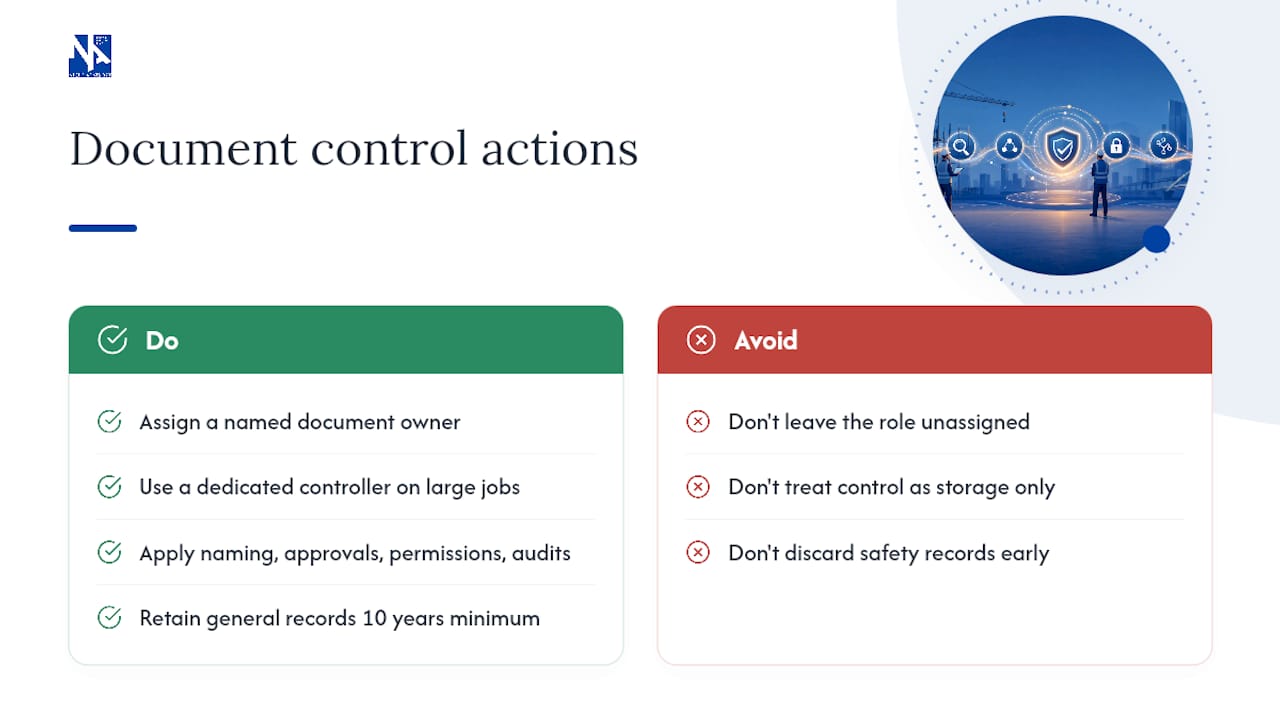
- Name one person as document controller, even on smaller projects where it is a shared role.
- Establish a single source of truth before drawings start moving, not after the first dispute.
- Write both decisions into the execution plan during mobilisation, not once problems surface.
Key Takeaways
Effective construction document control depends on naming a single accountable owner, enforcing one source of truth, and retaining records long enough to survive statutory warranty and dispute timelines.
| Point | Details |
|---|---|
| Assign one owner | Name a document controller during mobilisation so revision and transmittal tasks don’t fall through the cracks. |
| Separate revision from status codes | Use codes like P01/P02 for revisions and S1/S4 for status to prevent building from unauthorised files. |
| Stamp superseded files | Retain outdated drawings marked “SUPERSEDED” rather than deleting them, preserving your audit trail. |
| Match retention to risk | Keep most records 10 years minimum, plans and as-builts indefinitely, and extend further for structural or fire safety documentation. |
| Pick platforms on security, not just features | Check Australian data residency, SOC 2 or ISO 27001 status, and bulk-export rights before committing. |
Table of Contents
- What construction document control actually covers
- Essential documents every project must control
- Naming, versioning, and who’s allowed to touch what
- Choosing the right platform and mapping the workflow
- Retention rules and the evidentiary trail Australian projects need
- Who owns document control and what they actually do
- Mobilising document control in your first 30 days
- How Niche Advisory builds document control into every fitout
- Frequently asked questions
- Sources
What construction document control actually covers
Document control governs four things: creation, revision, distribution, and archiving, with an audit trail running underneath all of it. Every version needs a record of who created it, who changed it, when, and why, so five years from now someone can reconstruct exactly what was built and on whose instruction.
It’s easy to confuse this with document management, which is really just storage. Dropping PDFs into a shared drive is management. Document control is the governance layer on top: naming rules, approval sequences, permission tiers, and a defined process for what happens when a drawing gets superseded. AS-ISO-22263:2021 gives Australian projects a formal framework for organising this project information, covering both the documents themselves and the processes that produce them.
The scope is broader than most people expect on their first project. It covers architectural and engineering drawings, specifications, contracts and variations, RFIs and submittals, daily site diaries, progress photos, inspection certificates, and every compliance record generated along the way. Miss one category and you’ve got a gap that surfaces at the worst possible time, usually during a defects claim or a payment dispute.

Essential documents every project must control
Some document types carry more legal and operational weight than others. If your control plan only covers a handful of categories, make sure these are on the list:
- Architectural and discipline drawings, tracked through every revision with clear supersession records.
- Contracts, variations, and procurement records, including the paper trail behind every scope change.
- RFIs and submittals, with the date raised, the date answered, and the decision recorded against each.
- Inspection certificates and compliance evidence, covering structural sign-off, fire safety, and test results.
- Site diaries, progress photos, defect registers, and handover documents, which together form the evidentiary backbone of the project.
That last category deserves specific attention. A robust evidentiary trail for any defect includes the original notice, the work order raised to fix it, dated rectification photos, and a signed sign-off. Miss one link in that chain and you’ve got a weaker case if the issue resurfaces after handover.
Naming, versioning, and who’s allowed to touch what
Most document control failures trace back to one of three things: a naming system nobody follows, unclear revision status, or permissions loose enough that outdated files keep circulating. Fix these three and you’ve solved most of the everyday problems.
A naming convention that actually works follows a consistent pattern: JOBNUMBER_DOCTYPE_DESCRIPTION_REV_YYYYMMDD.ext. Using an ISO date format means files sort chronologically by default, and the job number keeps everything grouped even when files get shared outside the project folder. It’s a small habit that saves hours of searching later.
- Separate revision codes from status codes. Revision numbers (P01, P02, P03) track how many times a document has changed; status codes (S1 for issued for review, S4 for issued for construction) tell the site team whether it’s safe to build from.
- Stamp every outdated file “SUPERSEDED” rather than deleting it. You’ll want that history if a dispute ever questions which version was live on a given date.
- Require acknowledged transmittals for anything issued for construction. A transmittal that nobody has to confirm receipt of is not much better than an email that vanishes into an inbox.
- Set up role-based permission groups so subcontractors can view but not overwrite master files. Loose edit rights are how three different “final” versions end up on site at once.
- Log metadata consistently: who made the change, when, and why. That single field, “why,” is the one most registers skip and the one tribunal’s ask for.
Pro Tip: Run a “supersede test” once a month. Pick any drawing at random and ask your team to find the current issued-for-construction version in under 30 seconds. If they can’t, your naming or permission structure needs work.
These practices, including a single source of truth, disciplined naming, and acknowledged transmittals, form the backbone of nearly every functioning document control system on Australian sites.
Choosing the right platform and mapping the workflow
Four platform categories tend to show up in construction, and they solve different problems.
- Common data environments (CDEs) centralise all project information in one governed environment, usually the right fit for larger or multi-party projects.
- Project management information systems (PMIS) combine document control with cost, schedule, and contract administration.
- Drawing management tools focus specifically on revision control for plans and specs, useful where the drawing volume is high but other project functions run elsewhere.
- Field apps put document access and photo capture directly in site staff’s hands, feeding data back into whichever system holds the master records.
Whichever category you land on, run it through the same selection filters: Australian data residency where tender or confidentiality terms demand it, SOC 2 or ISO 27001 certification, clear backup recovery targets (RPO/RTO), and, critically, the right to bulk-export everything if you ever change providers.
Map the basic lifecycle before you configure anything: create, review, issue, acknowledge, update, archive. Transmittal acknowledgements and RFI triage are the two steps worth automating first, since they’re high-volume and low-judgement. Approvals that involve engineering sign-off or contractual interpretation still need a human in the loop.
Retention rules and the evidentiary trail Australian projects need
A pragmatic retention rule that covers most Australian projects: keep general project records for at least 10 years, keep plans and as-built drawings indefinitely, and extend retention further again for structural, fire safety, and hazardous-material documentation.
Statutory warranty periods shape this timeline directly. If a warranty period runs six or seven years in your state, your retention window needs to comfortably outlast it, because a claim lodged near the end of that period can still take years to resolve. The National Construction Code’s evidentiary expectations reinforce why exportable, timestamped audit trails matter so much: a compliance certificate with no clear date or approval chain behind it is far weaker evidence than one with a full digital paper trail.
Data residency matters here too, particularly on government or enterprise tenders where confidentiality clauses specify where records must be hosted. Confirm this before you sign a platform contract, not after.
Who owns document control and what they actually do
Ownership scales with project complexity. A small fitout might get by with a project manager handling document control alongside other duties. A multi-trade commercial build needs a dedicated document controller whose only job is keeping the register accurate.
Whatever the model, someone has to own these day-to-day tasks:
- Maintaining the master document register and revision log.
- Issuing and tracking transmittals, and following up on unacknowledged ones.
- Monitoring submittal and RFI status so nothing sits unanswered.
- Compiling the final archive and handover pack, checked against the original scope.
Sprintlaw’s guidance on this point is blunt: assign a single owner during mobilisation, because shared responsibility tends to mean no responsibility. That one decision prevents most of the “who was supposed to issue that” arguments that surface mid-project.
Mobilising document control in your first 30 days
Build this into your execution plan before subcontractors start pulling drawings:
- Appoint the document controller and write their scope into the project charter.
- Choose your platform category and confirm hosting, security, and export terms.
- Set naming conventions, seed folder structures and templates, and define permission groups.
- Run a short training session with the full project team, not just the office staff.
- Schedule regular audit checkpoints and a retention review date.
- Build the handover pack template early and test the transmittal and acknowledgement workflow on a low-stakes document before it matters.
Pro Tip: Test your transmittal workflow on something trivial, like a site induction form, before you use it for issued-for-construction drawings. You want to find the gaps before a $2 million variation depends on it.
Retrofitting document control after the project is underway is far riskier than setting it up during mobilisation, and it’s worth locking in your concrete placement and other critical trade sequencing against the same document baseline, a point covered well in this concrete placement planning guide.
How Niche Advisory builds document control into every fitout
Niche Advisory embeds document-control decisions into project and construction management from day one of mobilisation, not as an afterthought once drawings start circulating. That approach grew out of more than a decade managing workplace transitions where a missed revision or an unacknowledged transmittal can delay a whole relocation. Early design and workplace strategy planning benefits directly when the document baseline is locked in before the first fitout drawing goes out for review.
Frequently asked questions
What is construction document control?
It’s the governance system covering how project documents, drawings, contracts, RFIs, and certificates, are created, versioned, distributed, and archived so everyone works from the same authorised file.
How is document control different from document management?
Document management is storage. Document control adds the governance layer: naming rules, approval workflows, permission tiers, and audit trails on top of that storage.
Who should own document control on a project?
A dedicated document controller on larger or multi-trade jobs; on smaller fitouts, a project manager can hold the role provided it’s clearly assigned rather than left to whoever gets to it first.
How long should construction records be retained?
A pragmatic minimum is 10 years for general project records, with plans and as-built drawings kept indefinitely and longer retention for structural, fire safety, and hazardous-material documentation.
What’s the biggest mistake in construction document control?
Not naming an owner. Without clear accountability, tasks like issuing current drawings and updating variation registers tend to get missed until a dispute forces the issue.
If your organisation is planning a fitout, relocation, or workplace project and wants document control built into the process from day one rather than bolted on afterward, Niche Advisory manages that integration as part of its broader project and construction management services.
Sources
For deeper reference, consult AS-ISO-22263:2021 on organising project information, the National Construction Code for compliance evidence expectations, and Procore’s document control guide for broader workflow context.
- Construction document management — Built Simple (Australia)
- Control the chaos: Standardising construction project document workflows — Procore
- Construction documentation guide — Sprintlaw
- AS‑ISO‑22263:2021 — Australian Standards